1 Operating system interfaces
The job of an operating system is to share a computer among multiple programs and to provide a more useful set of services than the hardware alone supports. An operating system manages and abstracts the low-level hardware, so that, for example, a word processor need not concern itself with which type of disk hardware is being used. An operating system shares the hardware among multiple programs so that they run (or appear to run) at the same time. Finally, operating systems provide controlled ways for programs to interact, so that they can share data or work together.
An operating system provides services to user programs through an interface.
Designing a good interface turns out to be difficult. On the one hand, we would like the interface to be simple and narrow because that makes it easier to get the implementation right. On the other hand, we may be tempted to offer many sophisticated features to applications. The trick in resolving this tension is to design interfaces that rely on a few mechanisms that can be combined to provide much generality.
This book uses a single operating system as a concrete example to illustrate operating system concepts. That operating system, xv6, provides the basic interfaces introduced by Ken Thompson and Dennis Ritchie’s Unix operating system (Ritchie and Thompson 1974), as well as mimicking Unix’s internal design. Unix provides a narrow interface whose mechanisms combine well, offering a surprising degree of generality. This interface has been so successful that modern operating systems—BSD, Linux, macOS, Solaris, and even, to a lesser extent, Microsoft Windows—have Unix-like interfaces. Understanding xv6 is a good start toward understanding any of these systems and many others.
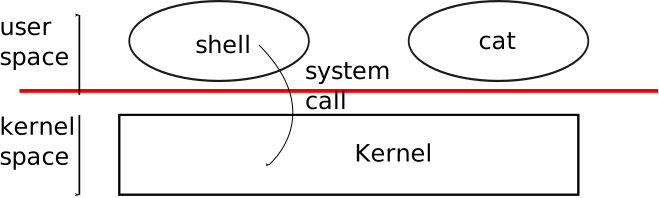
As Figure 1.1 shows, xv6 takes the traditional form of a kernel, a special program that provides services to running programs. Each running program, called a process, has memory containing instructions, data, and a stack. The instructions implement the program’s computation. The data are the variables on which the computation acts. The stack organizes the program’s procedure calls. A given computer typically has many processes but only a single kernel.
When a process needs to invoke a kernel service, it invokes a system call, one of the calls in the operating system’s interface. The system call enters the kernel; the kernel performs the service and returns. Thus a process alternates between executing in user space and kernel space.
As described in detail in subsequent chapters, the kernel uses the hardware protection mechanisms provided by a CPU1 to ensure that each process executing in user space can access only its own memory. The kernel executes with the hardware privileges required to implement these protections; user programs execute without those privileges. When a user program invokes a system call, the hardware raises the privilege level and starts executing a pre-arranged function in the kernel.
The collection of system calls that a kernel provides is the interface that user programs see. The xv6 kernel provides a subset of the services and system calls that Unix kernels traditionally offer. Figure 1.2 lists all of xv6’s system calls.
The rest of this chapter outlines xv6’s services—processes, memory, file descriptors, pipes, and a file system—and illustrates them with code snippets and discussions of how the shell, Unix’s command-line user interface, uses them. The shell’s use of system calls illustrates how carefully they have been designed.
The shell is an ordinary program that reads commands from the user and executes them. The fact that the shell is a user program, and not part of the kernel, illustrates the power of the system call interface: there is nothing special about the shell. It also means that the shell is easy to replace; as a result, modern Unix systems have a variety of shells to choose from, each with its own user interface and scripting features. The xv6 shell is a simple implementation of the essence of the Unix Bourne shell.
The implementation of the xv6 shell can be found at user/sh.c. The link is a hyperlink to the relevant xv6 source code at https://github.com/mit-pdos/xv6-riscv/ and the specific number refers to the sheet and line number in xv6-src-booklet.pdf, as in the Lions’ Commentary on UNIX 6th Edition (Lions 2000). A good practice is to try to read the source code first on your own (in your favorite development environment, on github, or in a PDF viewer) and then come back to this book. By the end of this book you should be able to understand every line of xv6 source code without having to consult this book.
1.1 Processes and memory
An xv6 process consists of user-space memory (instructions, data, and stack) and per-process state private to the kernel. Xv6 time-shares processes: it transparently switches the available CPUs among the set of processes waiting to execute. When a process is not executing, xv6 saves the process’s CPU registers, restoring them when it next runs the process. The kernel associates a process identifier, or PID, with each process.
| System call | Description |
|---|---|
| int fork() | Create a process, return child’s PID. |
| int exit(int status) | Terminate the current process; status reported to wait(). No return. |
| int wait(int *status) | Wait for a child to exit; exit status in *status; returns child PID. |
| int kill(int pid) | Terminate process PID. Returns 0, or -1 for error. |
| int getpid() | Return the current process’s PID. |
| int pause(int n) | Pause for n clock ticks. |
| int uptime() | Return the number of clock ticks since boot. |
| int exec(char *file, char *argv[]) | Load a file and execute it with arguments; only returns if error. |
| char *sbrk(int n) | Grow process’s memory by n zero bytes. Returns start of new memory. |
| int open(char *file, int flags) | Open a file; flags indicate read/write; returns an fd (file descriptor). |
| int write(int fd, char *buf, int n) | Write n bytes from buf to file descriptor fd; returns n. |
| int read(int fd, char *buf, int n) | Read n bytes into buf; returns number read; or 0 if end of file. |
| int close(int fd) | Release open file fd. |
| int dup(int fd) | Return a new file descriptor referring to the same file as fd. |
| int pipe(int p[]) | Create a pipe, put read/write file descriptors in p[0] and p[1]. |
| int chdir(char *dir) | Change the current directory. |
| int mkdir(char *dir) | Create a new directory. |
| int mknod(char *file, int, int) | Create a device file. |
| int fstat(int fd, struct stat *st) | Place info about an open file into *st. |
| int link(char *file1, char *file2) | Create another name (file2) for the file file1. |
| int unlink(char *file) | Remove a file. |
| int sync() | Wait until earlier file system modifications are on disk. |
A process may create a new process using the fork system call. fork gives the new process an exact copy of the calling process’s memory: fork copies the instructions, data, and stack of the calling process into the new process’s memory. fork returns in both the original and new processes. In the original process, fork returns the new process’s PID. In the new process, fork returns zero. The original and new processes are often called the parent and child.
For example, consider the following program fragment written in the C programming language (Kernighan 1988):
int pid = fork();
if(pid > 0){
  printf("parent: child=%d\n", pid);
  pid = wait((int *) 0);
  printf("child %d is done\n", pid);
} else if(pid == 0){
  printf("child: exiting\n");
  exit(0);
} else {
  printf("fork error\n");
}
The exit system call causes the calling process to stop executing and to release resources such as memory and open files. Exit takes an integer status argument, conventionally 0 to indicate success and 1 to indicate failure. The wait system call returns the PID of an exited (or killed) child of the current process and copies the exit status of the child to the address passed to wait; if none of the caller’s children has exited, wait waits for one to do so. If the caller has no children, wait immediately returns -1. If the parent doesn’t care about the exit status of a child, it can pass a 0 address to wait.
In the example, the output lines
parent: child=1234
child: exiting
might come out in either order (or even intermixed), depending on whether the parent or child gets to its printf call first. After the child exits, the parent’s wait returns, causing the parent to print
parent: child 1234 is doneAlthough the child starts with a copy of the parent’s memory, the parent and child execute with separate memory and separate registers: changing a variable in one does not affect the other. For example, when the return value of wait is stored into pid in the parent process, it doesn’t change the variable pid in the child. The value of pid in the child will still be zero.
The exec system call replaces the calling process’s memory with a new memory image loaded from a file stored in the file system. The file must have a particular format, which specifies which part of the file holds instructions, which part is data, at which instruction to start, etc. Xv6 uses the ELF format, which Chapter 3 discusses in more detail. Usually the file is the result of compiling a program’s source code. When exec succeeds, it does not return to the calling program; instead, the instructions loaded from the file start executing at the entry point declared in the ELF header. exec takes two arguments: the name of the file containing the executable and an array of string arguments. For example:
char *argv[3];

argv[0] = "echo";
argv[1] = "hello";
argv[2] = 0;
exec("/bin/echo", argv);
printf("exec error\n");
This fragment replaces the calling program with an instance of the program /bin/echo running with the argument list echo hello. Most programs ignore the first element of the argument array, which is conventionally the name of the program.
The xv6 shell uses the above calls to run programs on behalf of users. The main structure of the shell is simple; see main. The main loop reads a line of input from the user with getcmd. Then it calls fork, which creates a copy of the shell process. The parent calls wait, while the child runs the command. For example, if the user had typed “echo hello” to the shell, runcmd would have been called with “echo hello” as the argument. runcmd runs the actual command. For “echo hello”, it would call exec. If exec succeeds then the child will execute instructions from echo instead of runcmd. At some point echo will call exit, which will cause the parent to return from wait in main.
You might wonder why fork and exec are not combined in a single call; we will see later that the shell exploits the separation in its implementation of I/O redirection. To avoid the wastefulness of creating a duplicate process and then immediately replacing it (with exec), operating kernels optimize the implementation of fork for this use case by using virtual memory techniques such as copy-on-write (see Chapter 5).
Xv6 allocates most user-space memory implicitly: fork allocates the memory required for the child’s copy of the parent’s memory, and exec allocates enough memory to hold the executable file. A process that needs more memory at run-time (perhaps for malloc) can call sbrk(n) to grow its data memory by n zero bytes; sbrk returns the location of the new memory.
1.2 I/O and File descriptors
A file descriptor is a small integer representing a kernel-managed object that a process may read from or write to. A process may obtain a file descriptor by opening a file, directory, or device, or by creating a pipe, or by duplicating an existing descriptor. For simplicity we’ll often refer to the object a file descriptor refers to as a “file”; the file descriptor interface abstracts away the differences between files, pipes, and devices, making them all look like streams of bytes. We’ll refer to input and output as I/O.
Internally, the xv6 kernel uses the file descriptor as an index into a per-process table, so that every process has a private space of file descriptors starting at zero. By convention, a process reads from file descriptor 0 (standard input), writes output to file descriptor 1 (standard output), and writes error messages to file descriptor 2 (standard error). As we will see, the shell exploits the convention to implement I/O redirection and pipelines. The shell ensures that it always has three file descriptors open (sh.c:152), which are by default file descriptors for the console.
The read and write system calls read bytes from and write bytes to open files named by file descriptors. The call read(fd, buf, n) reads at most n bytes from the file descriptor fd, copies them into buf, and returns the number of bytes read. Each file descriptor that refers to a file has an offset associated with it. read reads data from the current file offset and then advances that offset by the number of bytes read: a subsequent read will return the bytes following the ones returned by the first read. When there are no more bytes to read, read returns zero to indicate the end of the file.
The call write(fd, buf, n) writes n bytes from buf to the file descriptor fd and returns the number of bytes written. Fewer than n bytes are written only when an error occurs. Like read, write writes data at the current file offset and then advances that offset by the number of bytes written: each write picks up where the previous one left off.
The following program fragment (which forms the essence of the program cat) copies data from its standard input to its standard output. If an error occurs, it writes a message to the standard error.
char buf[512];
int n;

for(;;){
  n = read(0, buf, sizeof buf);
  if(n == 0)
    break;
  if(n < 0){
    fprintf(2, "read error\n");
    exit(1);
  }
  if(write(1, buf, n) != n){
    fprintf(2, "write error\n");
    exit(1);
  }
}
The important thing to note in the code fragment is that cat doesn’t know whether it is reading from a file, console, or a pipe. Similarly cat doesn’t know whether it is printing to a console, a file, or whatever. The use of file descriptors and the convention that file descriptor 0 is input and file descriptor 1 is output allows a simple implementation of cat.
The close system call releases a file descriptor, making it free for reuse by a future open, pipe, or dup system call (see below). A newly allocated file descriptor is always the lowest-numbered unused descriptor of the current process.
File descriptors and fork interact to make I/O redirection easy to implement. fork copies the parent’s file descriptor table along with its memory, so that the child starts with exactly the same open files as the parent. The system call exec replaces the calling process’s memory but preserves its file table. This behavior allows the shell to implement I/O redirection by forking, closing and re-opening chosen file descriptors in the child, and then calling exec to run the new program. Here is a simplified version of the code a shell runs for the command cat < input.txt:
char *argv[2];

argv[0] = "cat";
argv[1] = 0;
if(fork() == 0) {
  close(0);
  open("input.txt", O_RDONLY);
  exec("cat", argv);
}
After the child closes file descriptor 0, open is guaranteed to use that file descriptor for the newly opened input.txt: 0 will be the smallest available file descriptor. cat then executes with file descriptor 0 (standard input) referring to input.txt. The parent process’s file descriptors are not changed by this sequence, since it modifies only the child’s descriptors.
The code for I/O redirection in the xv6 shell works in exactly this way (sh.c:83). Recall that at this point in the code the shell has already forked the child shell and that runcmd will call exec to load the new program.
The second argument to open consists of a set of flags, expressed as bits, that control what open does. The possible values are defined in the file control (fcntl) header (fcntl.h:1-5): O_RDONLY, O_WRONLY, O_RDWR, O_CREATE, and O_TRUNC, which instruct open to open the file for reading, or for writing, or for both reading and writing, to create the file if it doesn’t exist, and to truncate the file to zero length.
Now it should be clear why it is helpful that fork and exec are separate calls: between the two, the shell has a chance to redirect the child’s I/O without disturbing the I/O setup of the main shell. One could instead imagine a hypothetical combined forkexec system call, but the options for doing I/O redirection with such a call seem awkward. The shell could modify its own I/O setup before calling forkexec (and then un-do those modifications); or forkexec could take instructions for I/O redirection as arguments; or (least attractively) every program like cat could be taught to do its own I/O redirection.
Although fork copies the file descriptor table, each underlying file offset is shared between parent and child. Consider this example:
if(fork() == 0) {
  write(1, "hello ", 6);
  exit(0);
} else {
  wait(0);
  write(1, "world\n", 6);
}
At the end of this fragment, the file attached to file descriptor 1 will contain the data hello world. The write in the parent (which, thanks to wait, runs only after the child is done) picks up where the child’s write left off. This behavior helps produce sequential output from sequences of shell commands, like (echo hello; echo world) >output.txt.
The dup system call duplicates an existing file descriptor, returning a new one that refers to the same underlying I/O object. Both file descriptors share an offset, just as the file descriptors duplicated by fork do. This is another way to write hello world into a file:
fd = dup(1);
write(1, "hello ", 6);
write(fd, "world\n", 6);
Two file descriptors share an offset if they were derived from the same original file descriptor by a sequence of fork and dup calls. Otherwise file descriptors do not share offsets, even if they resulted from open calls for the same file. dup allows shells to implement commands like this: ls existing-file non-existing-file > tmp1 2>&1. The 2>&1 tells the shell to give the command a file descriptor 2 that is a duplicate of descriptor 1. Both the name of the existing file and the error message for the non-existing file will show up in the file tmp1. The xv6 shell doesn’t support I/O redirection for the error file descriptor, but now you know how to implement it.
File descriptors are a powerful abstraction, because they hide the details of what they are connected to: a process writing to file descriptor 1 may be writing to a file, to a device like the console, or to a pipe.
1.3 Pipes
A pipe is a small kernel buffer exposed to processes as a pair of file descriptors, one for reading and one for writing. Writing data to one end of the pipe makes that data available for reading from the other end of the pipe. Pipes provide a way for processes to communicate.
The following example code runs the program wc with standard input connected to the read end of a pipe.
int p[2];
char *argv[2];

argv[0] = "wc";
argv[1] = 0;

pipe(p);
if(fork() == 0) {
  close(0);
  dup(p[0]);
  close(p[0]);
  close(p[1]);
  exec("/bin/wc", argv);
} else {
  close(p[0]);
  write(p[1], "hello world\n", 12);
  close(p[1]);
}
The program calls pipe, which creates a new pipe and records the read and write file descriptors in the array p. After fork, both parent and child have file descriptors referring to the pipe. The child calls close and dup to make file descriptor zero refer to the read end of the pipe, closes the file descriptors in p, and calls exec to run wc. When wc reads from its standard input, it reads from the pipe. The parent closes the read side of the pipe, writes to the pipe, and then closes the write side.
If no data is available, a read on a pipe waits for either data to be written or for all file descriptors referring to the write end to be closed; in the latter case, read will return 0, just as if the end of a data file had been reached. The fact that read blocks until it is impossible for new data to arrive is one reason that it’s important for the child to close the write end of the pipe before executing wc above: if one of wc ’s file descriptors referred to the write end of the pipe, wc would never see end-of-file.
The xv6 shell implements pipelines such as grep fork sh.c | wc -l in a manner similar to the above code (sh.c:101). The child process creates a pipe to connect the left end of the pipeline with the right end. Then it calls fork and runcmd for the left end of the pipeline and fork and runcmd for the right end, and waits for both to finish. The right end of the pipeline may be a command that itself includes a pipe (e.g., a | b | c), which itself forks two new child processes (one for b and one for c). Thus, the shell may create a tree of processes. The leaves of this tree are commands and the interior nodes are processes that wait until the left and right children complete.
Pipes may seem no more powerful than temporary files: the pipeline
echo hello world | wccould be implemented without pipes as
echo hello world >/tmp/xyz; wc </tmp/xyzPipes have at least three advantages over temporary files in this situation. First, pipes automatically clean themselves up; with the file redirection, a shell would have to be careful to remove /tmp/xyz when done. Second, pipes can pass arbitrarily long streams of data, while file redirection requires enough free space on disk to store all the data. Third, pipes allow for parallel execution of pipeline stages, while the file approach requires the first program to finish before the second starts.
1.4 File system
The xv6 file system provides data files, which contain uninterpreted byte arrays, and directories, which contain named references to data files and other directories. The directories form a tree, starting at a special directory called the root. A path like /a/b/c refers to the file or directory named c inside the directory named b inside the directory named a in the root directory /. Paths that don’t begin with / are evaluated relative to the calling process’s current directory, which can be changed with the chdir system call. Both these code fragments open the same file (assuming all the directories involved exist):
chdir("/a");
chdir("b");
open("c", O_RDONLY);

open("/a/b/c", O_RDONLY);
The first fragment changes the process’s current directory to /a/b; the second neither refers to nor changes the process’s current directory.
There are system calls to create new files and directories: mkdir creates a new directory, open with the O_CREATE flag creates a new data file, and mknod creates a new device file. This example illustrates all three:
mkdir("/dir");
fd = open("/dir/file", O_CREATE|O_WRONLY);
close(fd);
mknod("/console", 1, 1);
mknod creates a special file that refers to a device. Associated with a device file are the major and minor device numbers (the two arguments to mknod), which uniquely identify a kernel device. When a process later opens a device file, the kernel diverts read and write system calls to the kernel device implementation instead of passing them to the file system.
A file’s name is distinct from the file itself; the same underlying file, called an inode, can have multiple names, called links. Each link consists of an entry in a directory; the entry contains a file name and a reference to an inode. An inode holds metadata about a file, including its type (file or directory or device), its length, the location of the file’s content on disk, and the number of links to a file.
The fstat system call retrieves information from the inode that a file descriptor refers to. It fills in a struct stat, defined in stat.h as:
#define T_DIR     1   // Directory
#define T_FILE    2   // File
#define T_DEVICE  3   // Device

struct stat {
  int dev;     // File system's disk device
  uint ino;    // Inode number
  short type;  // Type of file
  short nlink; // Number of links to file
  uint64 size; // Size of file in bytes
};
The link system call creates another file system name referring to the same inode as an existing file. This fragment creates a new file named both a and b.
open("a", O_CREATE|O_WRONLY);
link("a", "b");
Reading from or writing to a is the same as reading from or writing to b. Each inode is identified by a unique inode number. After the code sequence above, it is possible to determine that a and b refer to the same underlying contents by inspecting the result of fstat: both will return the same inode number (ino), and the nlink count will be set to 2.
The unlink system call removes a name from the file system. The file’s inode and the disk space holding its content are only freed when the file’s link count is zero and no file descriptors refer to it. Thus adding
unlink("a");to the last code sequence leaves the inode and file content accessible as b. Furthermore,
fd = open("/tmp/xyz", O_CREATE|O_RDWR);
unlink("/tmp/xyz");
is an idiomatic way to create a temporary inode with no name that will be cleaned up when the process closes fd or exits.
Unix provides file utilities callable from the shell as user-level programs, for example mkdir, ln, and rm. This design allows anyone to extend the command-line interface by adding new user-level programs. In hindsight this plan seems obvious, but other systems designed at the time of Unix often built such commands into the shell (and built the shell into the kernel).
One exception is cd, which is built into the shell (sh.c:166). cd must change the current working directory of the shell itself. If cd were run as a regular command, then the shell would fork a child process, the child process would run cd, and cd would change the child ’s working directory. The parent’s (i.e., the shell’s) working directory would not change.
1.5 Real world
Unix’s combination of “standard” file descriptors, pipes, and convenient shell syntax for operations on them was a major advance in writing general-purpose reusable programs. The idea sparked a culture of “software tools” that was responsible for much of Unix’s power and popularity, and the shell was the first so-called “scripting language.” The Unix system call interface persists today in systems like BSD, Linux, and macOS.
The Unix system call interface has been standardized through the Portable Operating System Interface (POSIX) standard. Xv6 is not POSIX compliant: it is missing many system calls (including basic ones such as lseek), and many of the system calls it does provide differ from the standard. Our main goals for xv6 are simplicity and clarity while providing a simple UNIX-like system-call interface. Several people have extended xv6 with a few more system calls and a simple C library in order to run basic Unix programs. Modern kernels, however, provide many more system calls, and many more kinds of kernel services, than xv6. For example, they support networking, windowing systems, user-level threads, drivers for many devices, and so on. Modern kernels evolve continuously and rapidly, and offer many features beyond POSIX.
Unix unified access to multiple types of resources (files, directories, and devices) with a single set of file-name and file-descriptor interfaces. This idea can be extended to more kinds of resources; a good example is Plan 9 (Presotto et al. 1991), which applied the “resources are files” concept to networks, graphics, and more. However, most Unix-derived operating systems have not followed this route.
The file system and file descriptors have been powerful abstractions. Even so, there are other models for operating system interfaces. Multics, a predecessor of Unix, abstracted file storage in a way that made it look like memory, producing a very different flavor of interface. The complexity of the Multics design had a direct influence on the designers of Unix, who aimed to build something simpler.
Xv6 does not provide a notion of users or of protecting one user from another; in Unix terms, all xv6 processes run as root.
This book examines how xv6 implements its Unix-like interface, but the ideas and concepts apply to more than just Unix. Any operating system must multiplex processes onto the underlying hardware, isolate processes from each other, and provide mechanisms for controlled inter-process communication. After studying xv6, you should be able to look at other, more complex operating systems and see the concepts underlying xv6 in those systems as well.
1.6 Exercises
- Write a program that uses UNIX system calls to “ping-pong” a byte between two processes over a pair of pipes, one for each direction. Measure the program’s performance, in exchanges per second.
This text generally refers to the hardware element that executes a computation with the term CPU, an acronym for central processing unit. Other documentation (e.g., the RISC-V specification) also uses the words processor, core, and hart instead of CPU.↩︎